TMMR Release Notes
Update 1.7.0
September 2026
Hey, thank you for being part of the team here at TMMR. Update 1.7.0 is live. Two big pieces: Network, so you can hand a tour to a trusted operator and take one back inside the app, and the Booking Workspace, which puts every piece of a booking on one screen. We also fixed 14 bugs you reported. Keep them coming.
Network
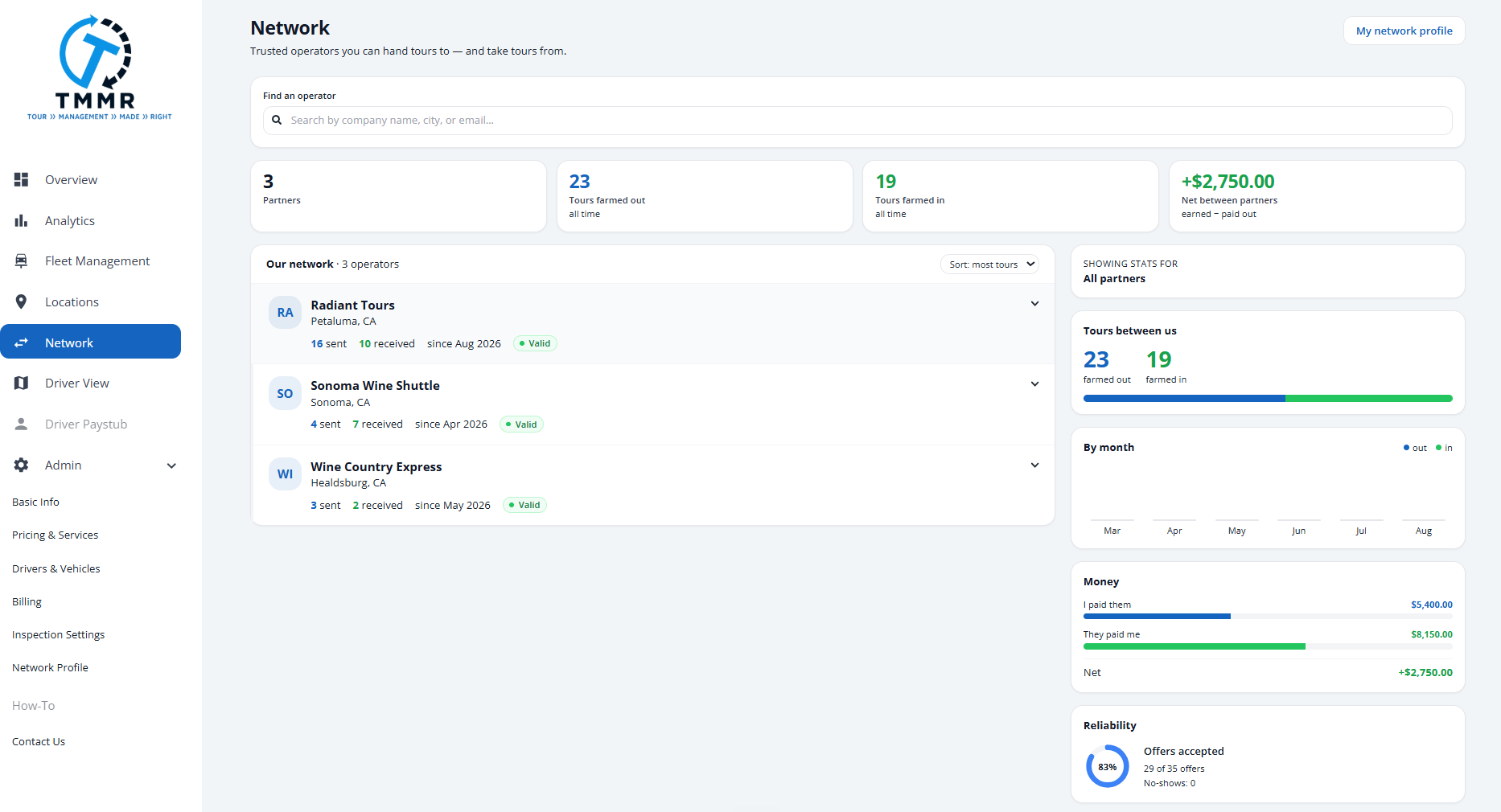
Trusted operators you can hand tours to, and take tours from.
When a booking lands on a day you cannot cover, you call around, text a competitor you actually like, and track the whole thing in your head. Network replaces that.
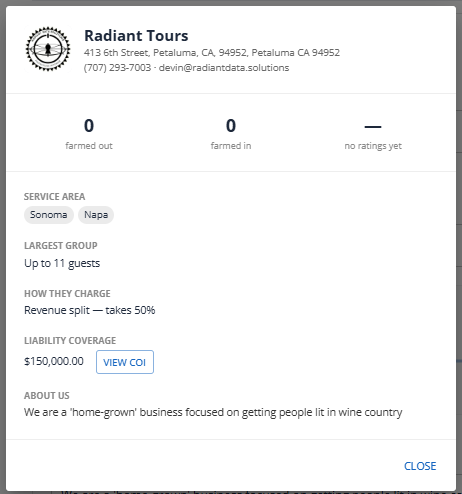
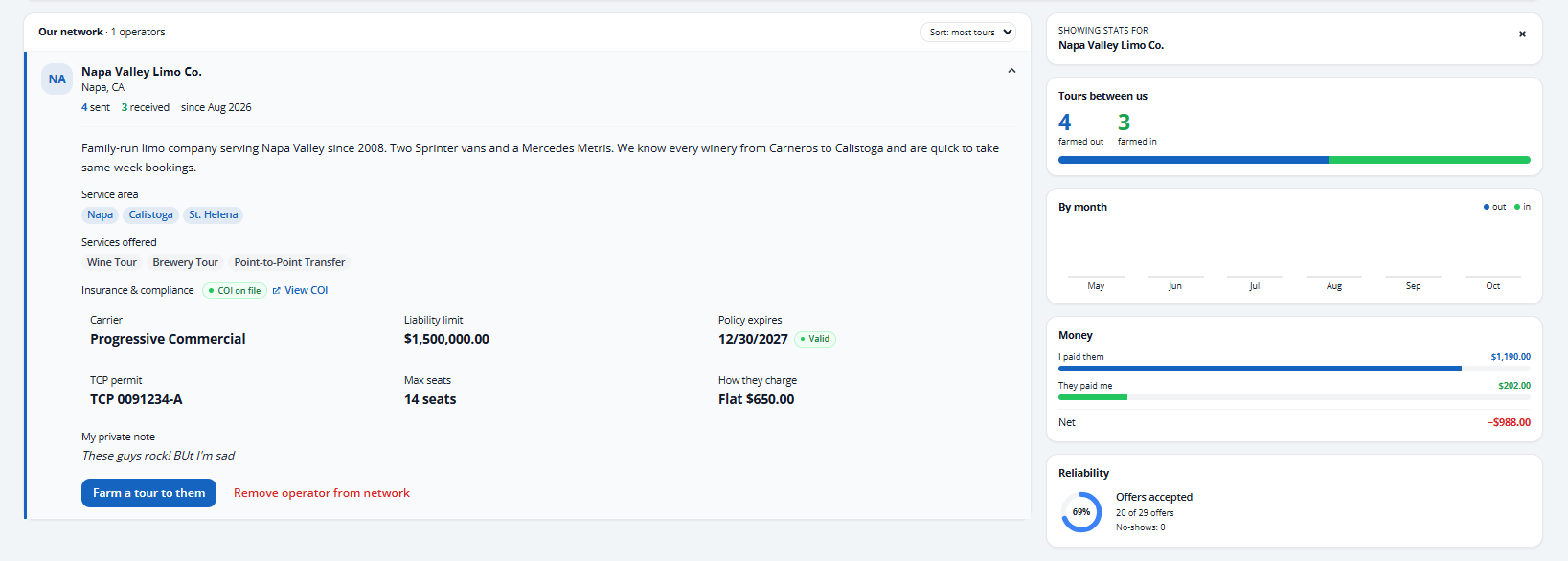
It is a private, invite-only list of operators you have connected with. Search by company name, city, or email, preview a profile, and send an invite. Once connected you can see what each partner carries: insurance status, service area, max seats, payout terms, and their COI. Nothing is public and nothing is automatic.
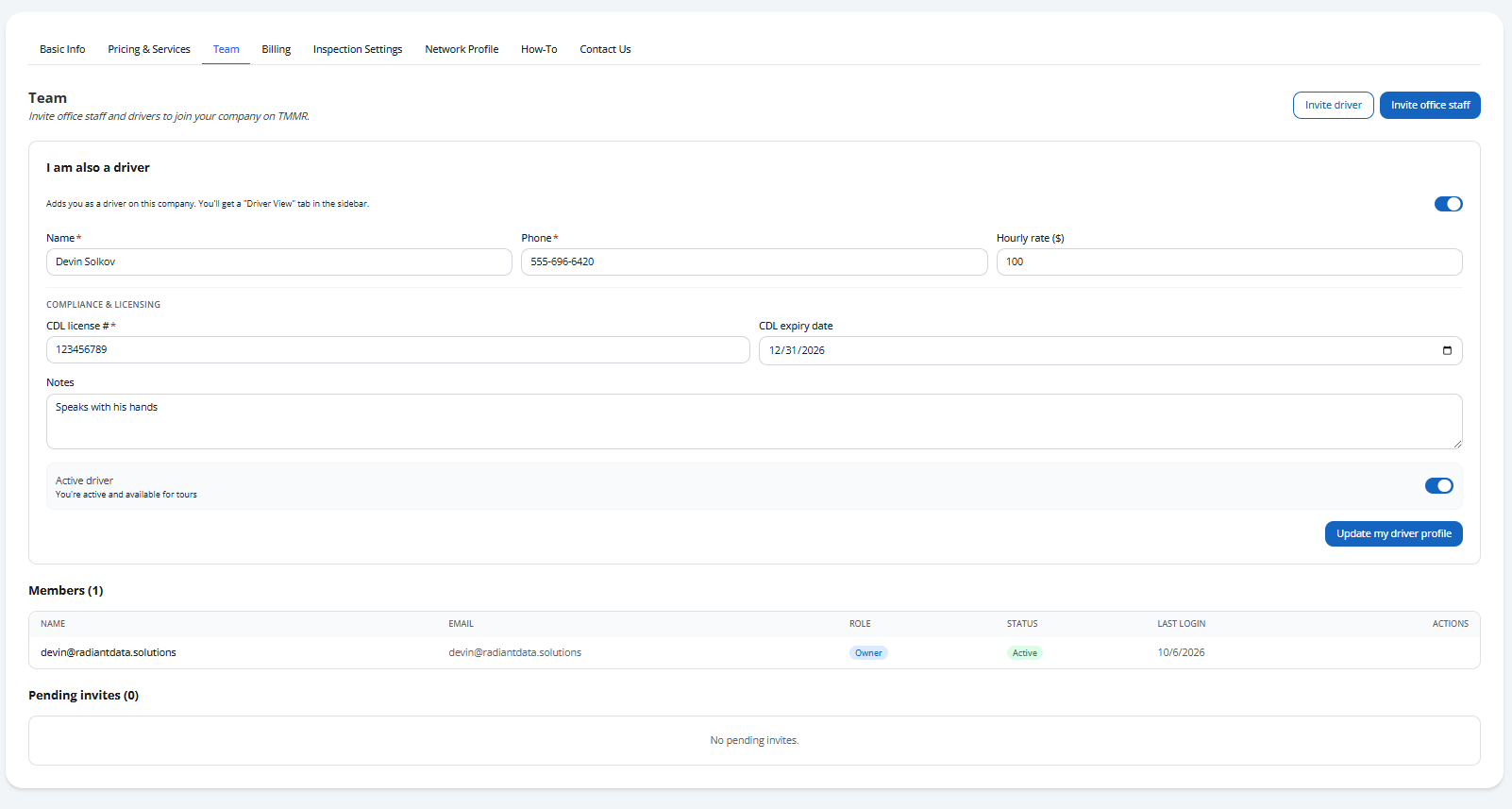
Your network profile
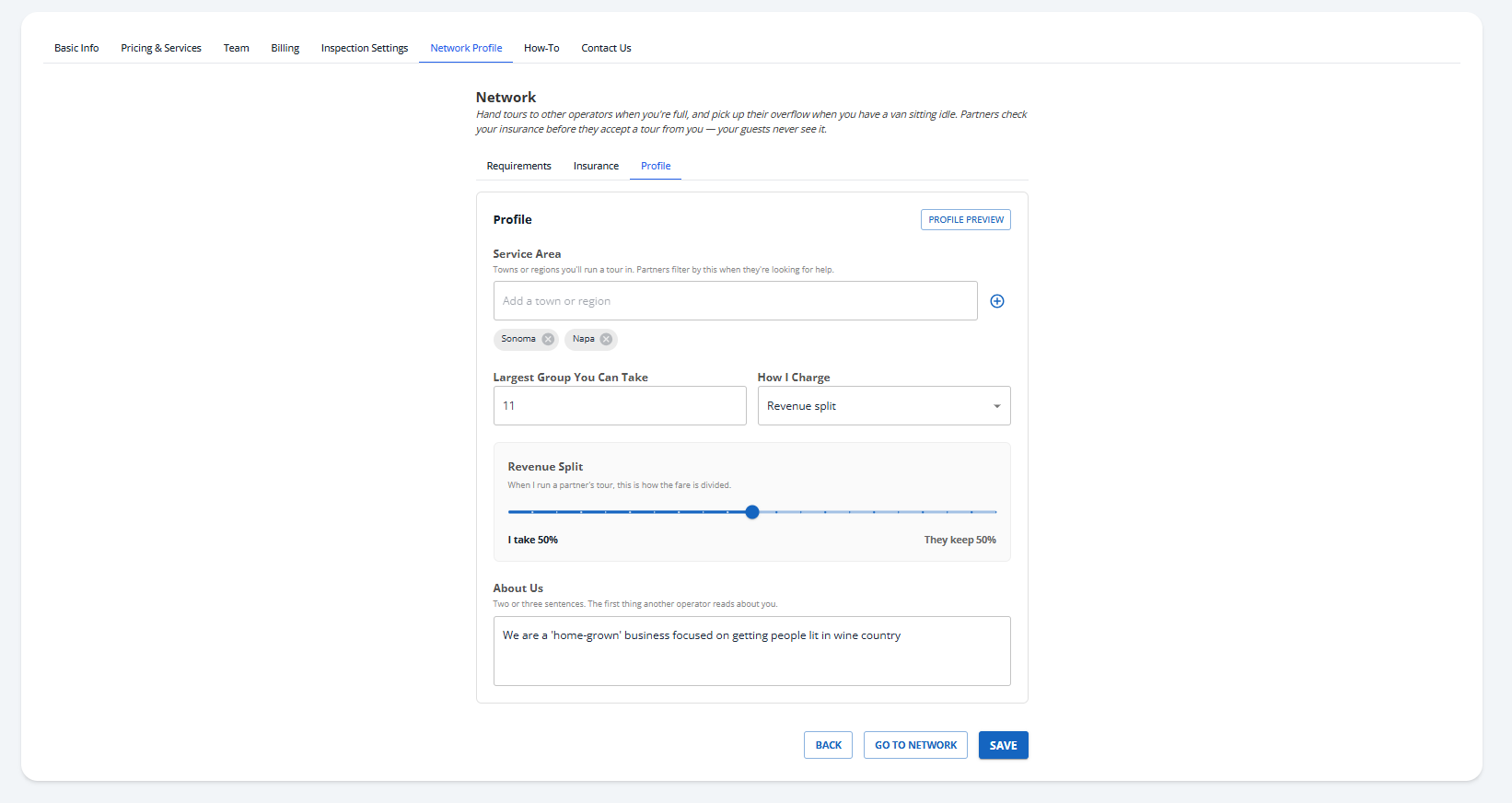
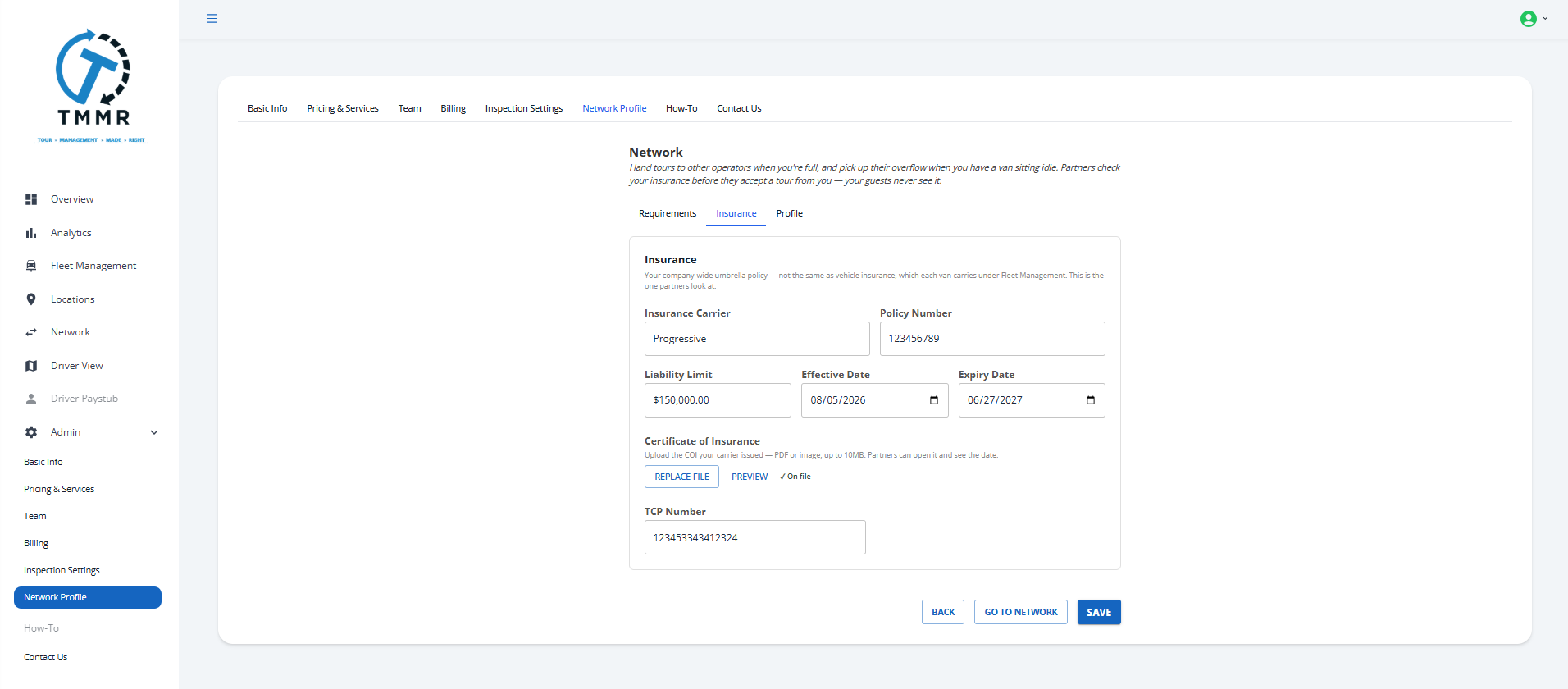
Before another operator can see you, you fill out a profile: regions, max group size, payout terms, a short bio, and your compliance block. That profile is what a partner previews, and it is what makes you eligible for offers, so an expired COI takes you out of the pool automatically.
To join the Network, the account owner also needs to verify their email address. If you have not yet, a Resend verification email button sits on the Network step of your company profile. This only affects the Network. Login and the rest of TMMR work the same whether you verify or not, and companies already in the Network before this update are not affected.
Tour farming
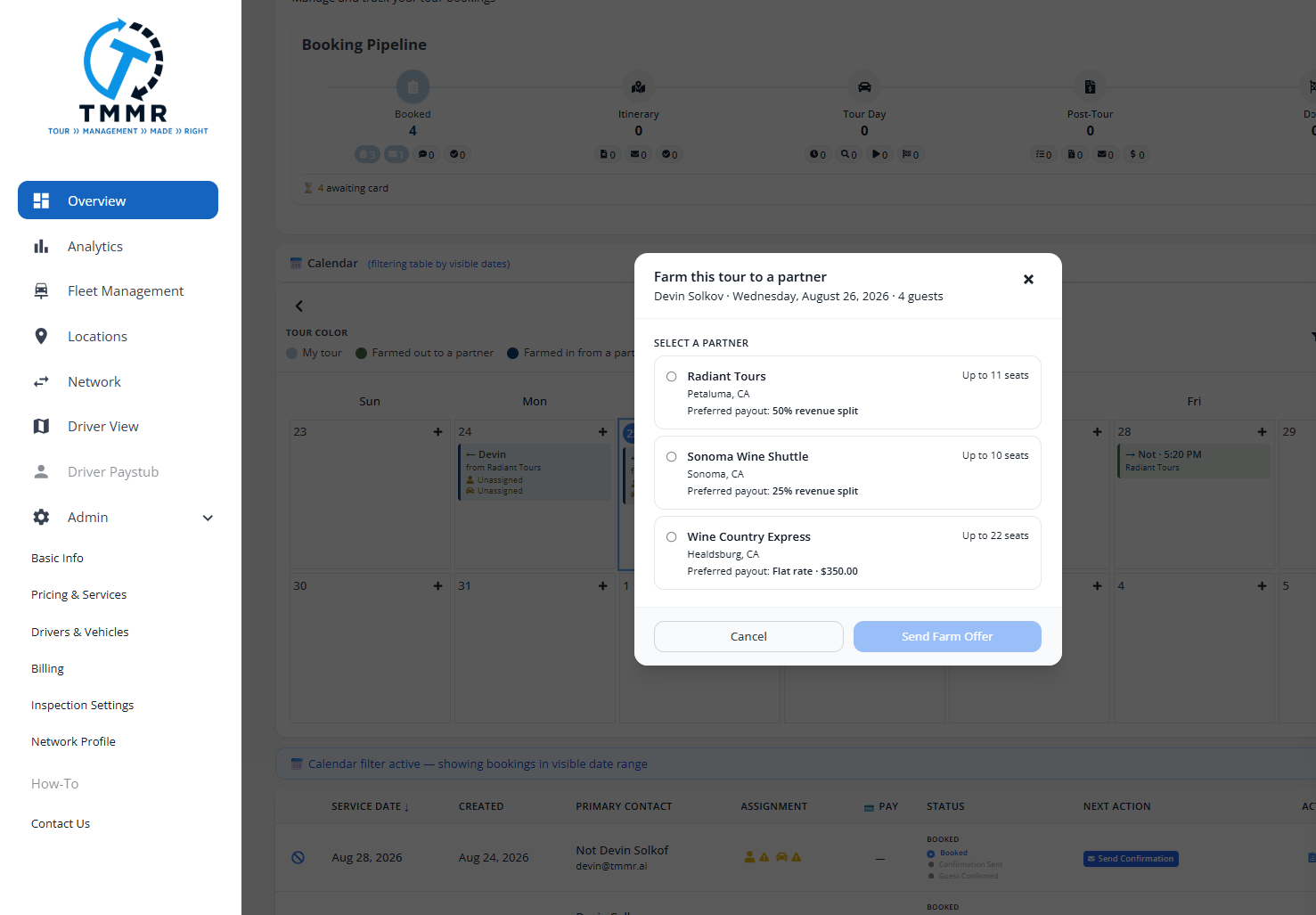
Offer a tour, negotiate the number, and hand it over without leaving the app.
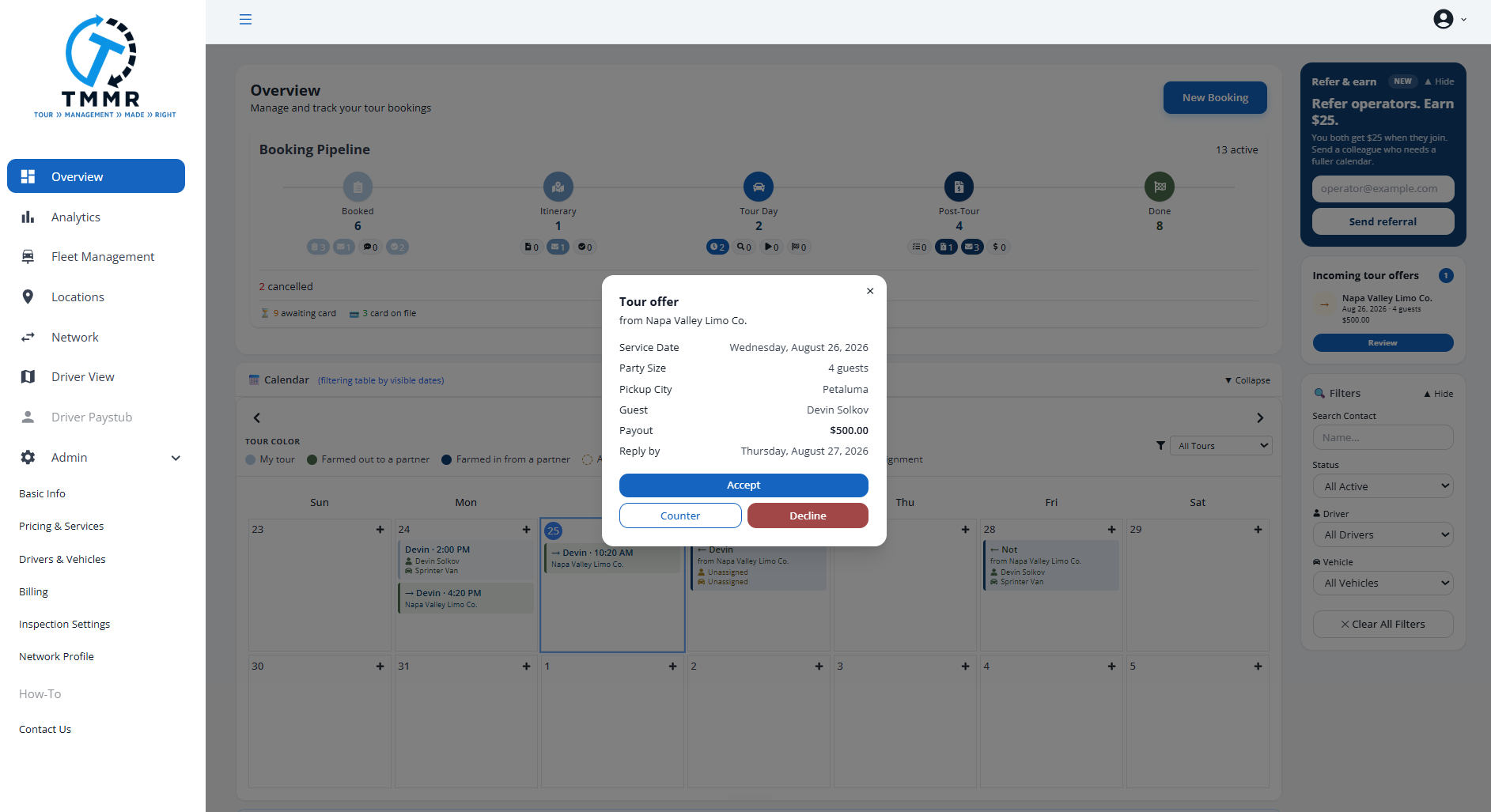
From any booking, pick an operator, set the payout as a flat amount or a percentage, and send the offer. They see the full tour: date, guest count, pickup, stops, and the money. They accept, decline, or counter. Every state change is logged and both calendars stay in sync.
- Two rows, one tour. Their driver, vehicle, inspection and paystub never touch your data, and yours never touch theirs.
- The itinerary flows through. Save or approve on your side and their copy updates. Their driver checks off a stop and you see it live.
- Read-only where it should be. They cannot edit your itinerary. They get an ownership banner instead of a silent conflict.
- Post-tour comes back. Their driver's reported times, mileage, and tip land on your tour and push it to office review.
Payouts and the farmed-tour ledger
Know exactly who owes who, and close it out when it is paid.
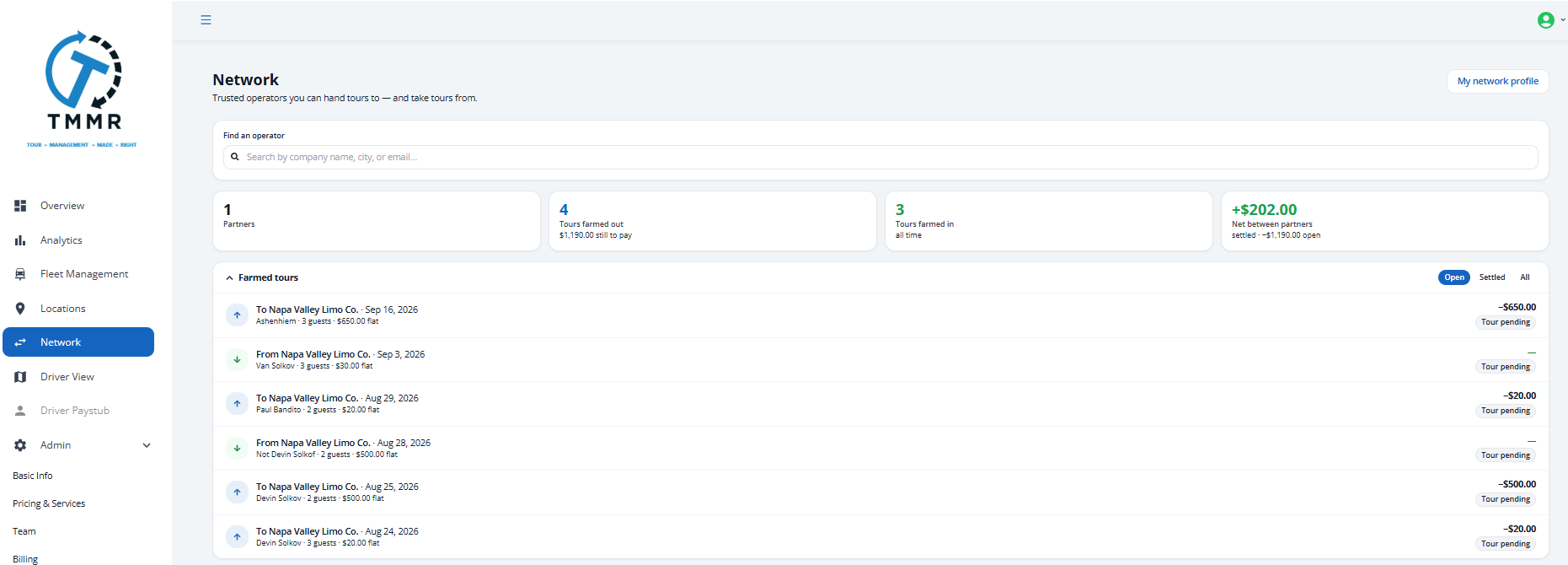
After you bill the guest, an I paid the partner toggle appears on the Invoice page and under Booking → Network. Flipping it freezes the payout, emails the partner, and moves the tour into settlement. Confirm payout received on their side closes the loop: both copies go to settled and the event is logged on both sides.
- Farmed tours. Everything in flight and everything closed, filtered by Open, Settled, or All, with the per-tour amount.
- The Money rail. Paid out, paid in, and the net with every partner, pulled from your own tours rather than a shared counter.
Booking Workspace
One booking. One screen. Everything that belongs to it.
Working a booking used to mean bouncing between pages. Open a booking now and the main sidebar is replaced by one for that booking.
- Booking Details: the booking form you already know
- Itinerary: the builder, with the route map alongside
- Inspection: the pre-trip checklist for this tour
- Waybill: the printable driver document
- Invoice: billing and payment, no longer on its own page
- Network: farm status, partner, payout, and settlement for this tour
Communications is in the sidebar too, as a preview. The guest and partner message feed lands in a later update.
Sections unlock as the booking progresses, so you are not staring at an empty invoice on an unconfirmed booking. The header carries the guest, date, service, and party size, plus Status, Vehicle, and Driver chips. Click the Vehicle or Driver chip to assign from your fleet, or add a new one right there.
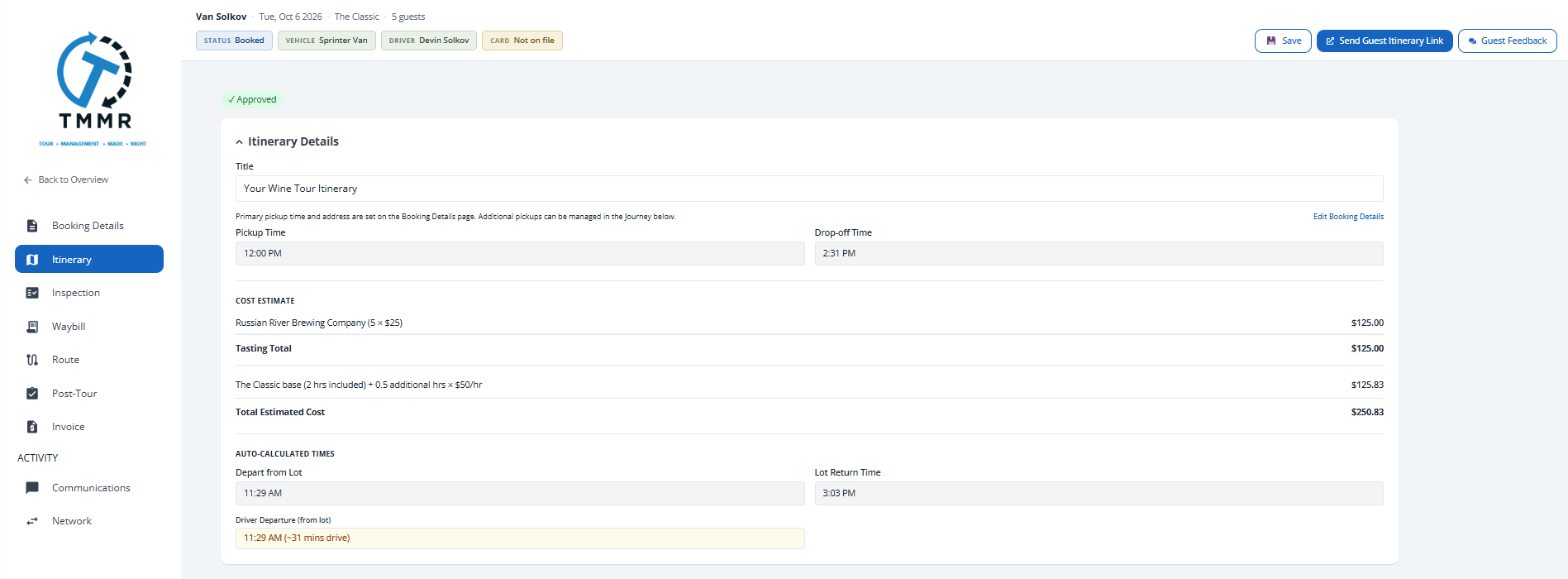
Itinerary Builder
Full width, live route map, and reservation times that stay put.
The builder uses the full width of your screen now, and the Journey timeline and Route Map sit side by side.
- Reservation Time per stop. A 12:30 tasting is a fact, not an estimate. Recalculating travel time will never overwrite it, and the estimated arrival still shows alongside so you can see your buffer.
- Cost Estimate is inline. Tasting fees, transportation pricing, and the total live in the Itinerary Details card instead of below the fold.
- Auto-calculated times are grouped. Depart from Lot and Lot Return sit together, marked as derived, so it is obvious what you control.
- Pickup and drop-off belong to the booking. Read-only here with an "Edit in Booking Details" shortcut, so the same address cannot say two different things.
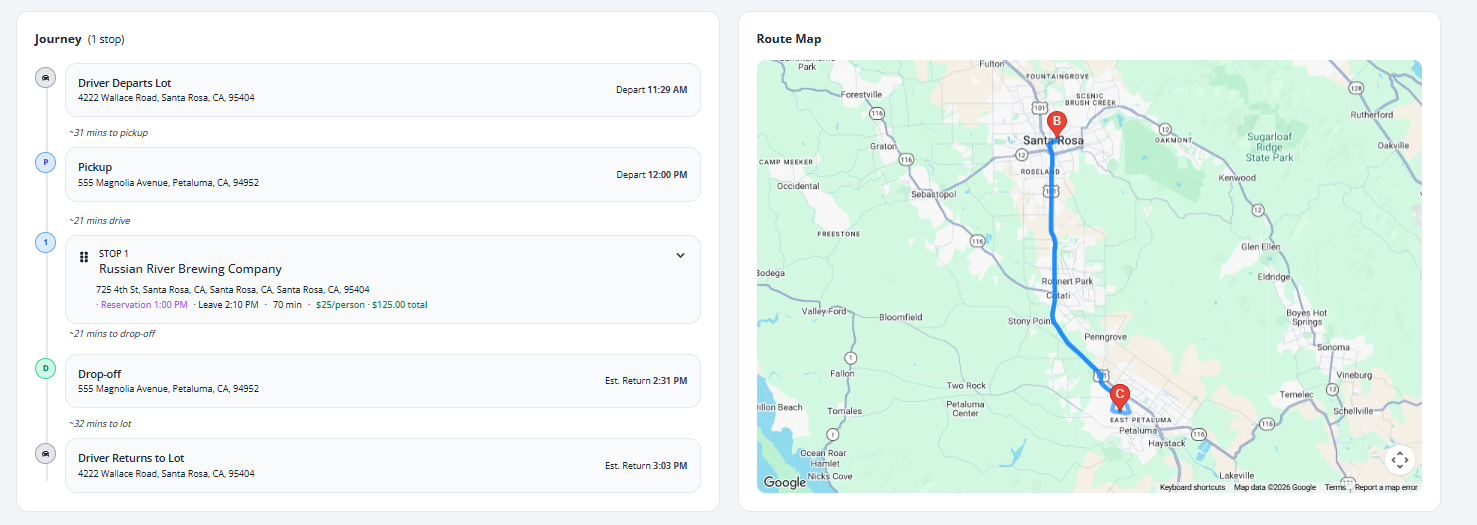
Team
Office staff and drivers in one list, with real controls.
Office staff now join by invite, the same way drivers already did. Send it from the new Team page, they set their own name and password on a single-use link, and they appear as a member. Drivers sit in the same list with a Driver badge, pending invites alongside them.
- Deactivate, reactivate, remove. The owner and your own account are always protected.
- Removing a driver keeps their history. The login goes, the driver profile and tour history stay, so you can re-invite later without losing anything.
- One home for people. The old "Drivers & Vehicles" settings tab is gone. Fleet Management owns fleet, Team owns people.
Free trial, no card
14 days of full access without typing a card number.
Starting a trial no longer sends you to a Stripe checkout or asks for a card. Click start, get 14 days of everything. Never add a card and the trial simply ends. Add one at any point and billing picks up automatically with nothing else for you to do.
Plan, status, and billing now live in one place under Admin → Billing instead of being split across two screens. We also dropped the blanket subscription gate: if your plan lapses you can still open past bookings, run reports, and edit settings. Only creating a new booking is blocked, and the button grays out with an explanation instead of failing silently.
Registration that knows who you are
Signup now collects your full name, company name, company phone, and Terms acceptance instead of just an email and password, so confirmations and invoices do not go out with blanks in them.
Checks before you send
Catch the missing logo before the guest does.
Booking Confirmation, Itinerary, and Invoice now run a quick check before they send and warn you about a missing logo, address, pricing, fleet, or assignment. Dismiss it and send anyway.
One check is not dismissable. Sending or approving an itinerary without a lot or garage address is a hard stop, because every travel-time and return-time estimate on it is silently wrong without one. An inline "Add garage address now" box fixes it in two clicks.
Your company profile also carries a completeness checklist, in the account menu. Each item links to the screen that fixes it, and the menu shows how many are left.
Calendar
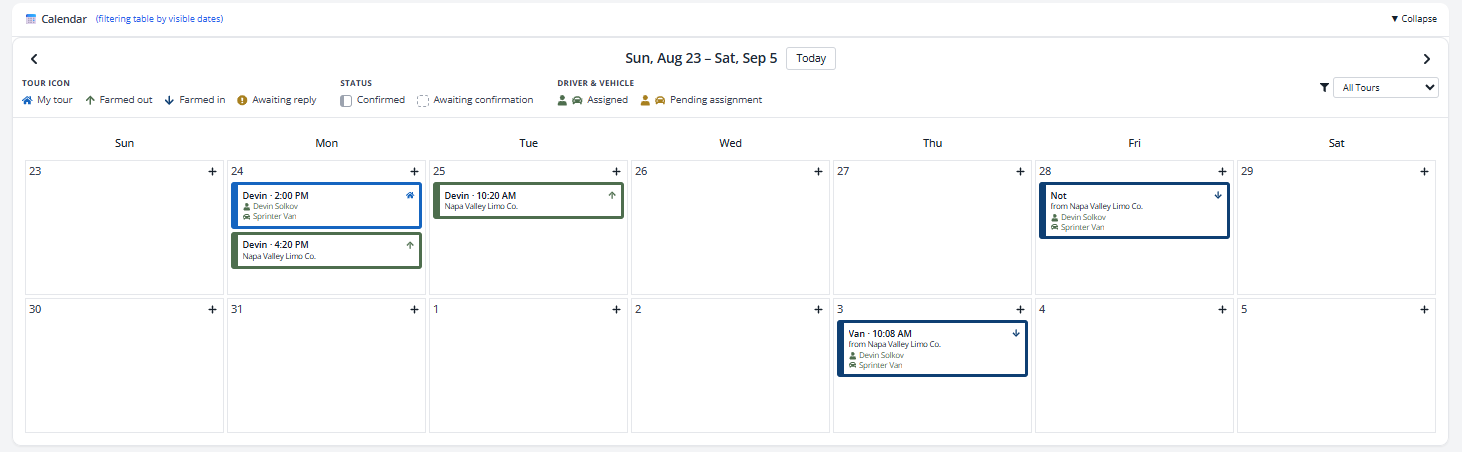
Tell whose tour it is without reading a word.
Calendar cards were restyled to white with a thick colored border, a left accent bar, and an ownership icon. The icon tells you whose tour it is:
- House, blue — your tour
- Up arrow, deep blue — you farmed it out
- Down arrow, green — you took it in
- Exclamation, gold — waiting on a reply
- Dashed border — not settled yet
- Solid border with a left bar — settled
Driver and vehicle text is green when assigned and mustard when it is not, so an unassigned tour stands out from across the room. The legend sits on the page too.
Fixes
Most of these came from you. Keep them coming.
| Where | What was wrong, and what we did |
|---|---|
| Booking numbers | Reference numbers were checked for uniqueness across every company instead of within your own, so a new company's first booking could fail to save. They are now unique per company and handed out by a counter that cannot collide. |
| Guest itinerary | The guest-facing itinerary rendered in a narrow centered column, squeezing the timeline and wrapping times like "Depart 10:00" onto two lines. It now uses the full width. |
| Booking form | Service Type, Vehicle, and Driver dropdowns came up blank when you reopened a saved booking. They now load with the saved selection showing. |
| Booking form | Typing into the Deposit Amount field swallowed trailing digits, so typing a zero onto "$5.00" looked like nothing happened. The field now lets you type freely and formats to currency when you click away. |
| Booking confirmation | Previewing a confirmation on an edited booking where you had not touched the pickup time crashed the page to blank white. Fixed. |
| Booking confirmation | Confirmation emails never carried your company logo, even when one was uploaded. They do now. |
| Company Profile | Saving Basic Info a second time, without retyping the phone number, silently did nothing. The phone field now formats as you type and validates every time. |
| Network | A declined or cancelled farmed tour still showed up as a live booking on the receiving operator's dashboard and calendar. It no longer does. |
| Network | Per-partner tours sent, received, paid, and earned were direction-blind, so both companies saw identical numbers. Each side now sees its own. |
| Network | Declining or cancelling a counteroffer failed outright. Fixed, and the tour correctly returns to your control. |
| Network | Accepting a counteroffer advanced the tour but never recorded the money, so the Money rail stayed at $0.00. It now records the agreed amount. |
| Fleet | A farmed-in tour never rolled its end mileage onto the partner's vehicle, because it never reaches run-sheet finalization. Mileage now updates on hand-back. |
| Itinerary | Per-stop notes did not save. The editor wrote to one field and the itinerary read from another. They now agree. |
| Login | The login card had a fixed height that clipped the "Register your Company?" link off the bottom. The card now sizes to its content. |
Tell us what to build next
Nearly everything in 1.7.0 started as something an operator told us was annoying. If something in your day still is, we want to hear it.
Send us feedback Schedule a demo View the release archive